From guide desk to examination entrance.Short routes with staff handover.
KAGO provides location information, short walking guidance and repeated messages linking outpatient guide desks, examination entrances and waiting areas.
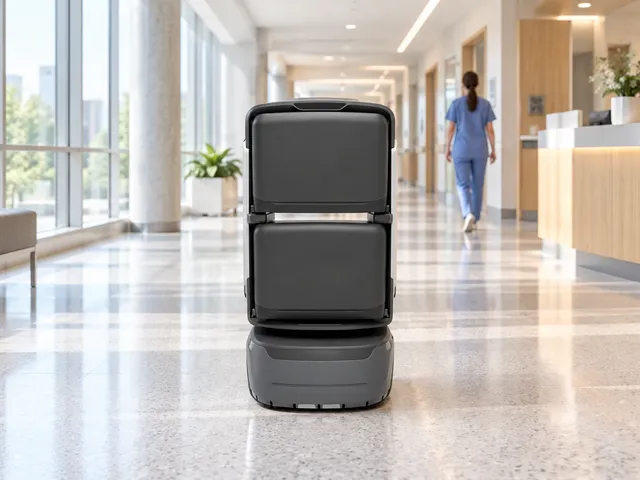
Select a destination or tour at the service point.
Lead along the route and play checkpoint content.
Confirm arrival and continue the human service.
Where the service helps
Coordinate routes, content and staff around these tasks.
Location information
Select a destination for screen/voice guidance.
Short-distance escort
Lead along validated public routes.
Repeated messages
Play approved waiting-area and service reminders.
Triage, diagnosis, insurance/payment and automatic identity checks are outside scope. A short-route pilot does not establish full-campus coverage.
Service flow and ownership
Robots execute configured tasks; responsible staff retain verification and on-site response.
Select a destination or tour at the service point.
Create a task from configured destinations and routes.
Lead along the route and play checkpoint content.
Confirm arrival and continue the human service.
Review tasks and maintain routes and content.
Confirm execution separately from human handover/review; assigned staff take over exceptions.
Roles
Reception staff
Start service, check destinations and continue reception.
Robot
Guide and announce along configured routes; report task status.
Managers
Maintain locations, routes, scripts, accounts and exception procedures.
Service modes
Select modes for the workflow; agree extensions separately.
Location information
Select a destination for screen/voice guidance.
Short-distance escort
Lead along validated public routes.
Repeated messages
Play approved waiting-area and service reminders.
Triage, diagnosis, insurance/payment and automatic identity checks are outside scope. A short-route pilot does not establish full-campus coverage.
Scenario fit
KAGO provides location information, short walking guidance and repeated messages linking outpatient guide desks, examination entrances and waiting areas.
Location information
Select a destination for screen/voice guidance.
Short-distance escort
Lead along validated public routes.
Repeated messages
Play approved waiting-area and service reminders.
Terminals and configuration
Document-based scope; confirm supplied model, options and site fit.
KAGO
Screen, voice, route navigation and task records.
Optional extensions
Assess APIs, doors and lifts; validate off-peak small-item/document delivery later.
Coordination priorities
Assign suitable repeated routes to robots and compare results in the pilot.
Verify outcomes against task, destination and responsible role.
Use task states and exception records to adjust routes, schedules and configuration.
Routes and service points
Configure routes for the actual site; diagrams explain the workflow.
Guide desk
Staff help start and confirm destinations.
Outpatient / waiting areas
Short, clear and repeatable guidance.
Exam entrance / nurse station
Hand over to on-site staff.
Locations
- Guide desk
- Outpatient / waiting areas
- Exam entrance / nurse station
Diagrams explain the flow; survey actual passages, thresholds, access and stops.
Site readiness and operations
Confirm site, equipment and staffing; verify interfaces per project.
Standalone operation
Pilot configured points and routes without requiring HIS integration.
Service boundary
Guide-desk staff assist with congestion, mobility needs or destinations outside the route.
Commission configured interfaces, notifications and access; assign site contacts and staff fallback.
Document configuration and device checks
| KAGO | Screen, voice, route navigation and task records. |
|---|---|
| Optional extensions | Assess APIs, doors and lifts; validate off-peak small-item/document delivery later. |
Document and current product versions may differ; confirm supplied specifications and project configuration.
Pilot and expansion
Start with frequent short outpatient routes; confirm walking pace, handover points and staff assistance.
KAGO
Screen, voice, route navigation and task records.
Optional extensions
Assess APIs, doors and lifts; validate off-peak small-item/document delivery later.
Suggested sizing assessment
Match complete task durations to actual request frequencyUse site data including access, handover, waiting, charging and exceptions; travel speed alone does not establish capacity.
This is an assessment method; source recommendations/targets are not universal performance guarantees.
Sizing considerations
Task cycle
Measure request, execution, handover, return and charging time.
Site scope
Guide desk, Outpatient / waiting areas, Exam entrance / nurse station
Staff coordination
Allow for available receiving, reviewing and exception-response staff.
Source configurations/data refer to their stated scenario; confirm final sizing through site validation.
Suggested implementation
The following are project assessment and acceptance suggestions, subject to site confirmation.
Confirm scope
Site preparation
Configure and commission
When ready
Trial and acceptance
By project agreement
Suggested exception handling
The following are project assessment and acceptance suggestions, subject to site confirmation.
| Condition | Action | Ownership and records |
|---|---|---|
| Task cannot continue | Pause, wait or hand over to staff under site rules. | Managers record cause, owner and recovery conditions. |
| Handover/review incomplete | Contact the assigned staff; automatic task closure does not replace their confirmation. | Record the reason and follow-up. |
| Device/access exception | Follow support procedures and use staff service if required. | Support and site staff coordinate and validate recovery. |
Common questions
Where should the pilot start?
Start with frequent short outpatient routes; confirm walking pace, handover points and staff assistance.
How do robots and staff share work?
Reception staff:Start service, check destinations and continue reception. Robot:Guide and announce along configured routes; report task status. Managers:Maintain locations, routes, scripts, accounts and exception procedures.
What needs separate confirmation?
Triage, diagnosis, insurance/payment and automatic identity checks are outside scope. A short-route pilot does not establish full-campus coverage.
How are configuration and acceptance set?
Use source recommendations as a starting point, then confirm against site routes, supplied equipment and trial data. Suggested checks do not establish fixed performance or service guarantees.
Pilot preparation
Start with frequent short outpatient routes; confirm walking pace, handover points and staff assistance.
| Item | Scope | Confirmation |
|---|---|---|
| Scope and points | Guide desk, Outpatient / waiting areas, Exam entrance / nurse station | Confirm accessible scope and responsible staff on site. |
| Routes and access | Maps, passages, doors/lifts, network and charging. | Commission cross-floor and controlled-door access as needed; diagrams do not replace site tests. |
| Handover and exceptions | Reception staff, Robot, Managers | Agree notifications, staff takeover, records and review rules. |
Scope and points
Guide desk, Outpatient / waiting areas, Exam entrance / nurse station Confirm accessible scope and responsible staff on site.
Routes and access
Maps, passages, doors/lifts, network and charging. Commission cross-floor and controlled-door access as needed; diagrams do not replace site tests.
Handover and exceptions
Reception staff, Robot, Managers Agree notifications, staff takeover, records and review rules.
Related equipment
Review product information and reconcile the document version with the supplied model/configuration.
View productRelated solutions
Choose a dedicated solution for each workflow.
Hospital medication delivery solution
Robots transport medication from pharmacies to nurse stations; clinical staff prepare/check drugs, authorize receipt and administer them.
Explore Solution →Hospital specimen delivery solution
Connect collection points and laboratories for packaged specimen transport.
Explore Solution →Hospital ward reminder solution
KAGO delivers hospital-approved voice/screen reminders at configured ward points through scheduled, circulating, ad hoc and stationed service.
Explore Solution →