Replenish workshops and move work in progress.Manage empty-container returns by task.
Support line replenishment, work-in-progress, tools, spares and empty-container or defective-part returns through scheduled, called or system-created tasks.
Select items, destination and required time.
Follow configured routes and access rules.
Receive the arrival alert, use configured access and verify receipt.
Pilot the documented workflow with responsible staff verifying key handovers.
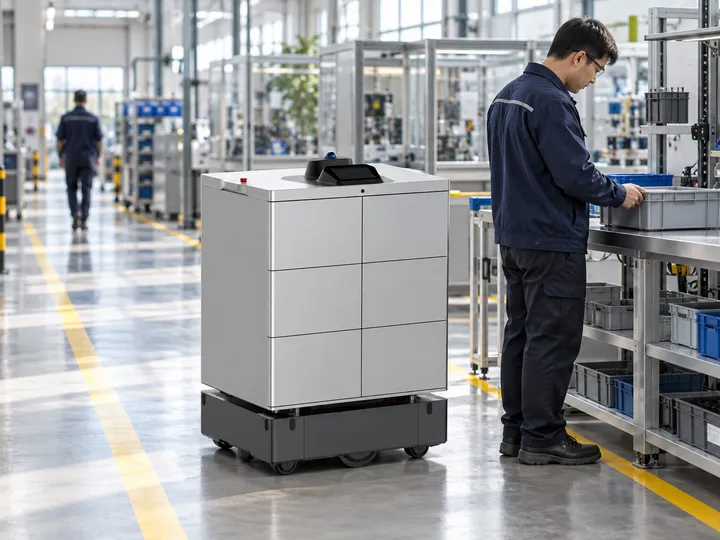
Where the service helps
Reduce repeated trips around these tasks and define on-site handovers.
Indoor delivery
Small robots handle frequent floor/workstation tasks.
Cross-area delivery
Large robots handle campus, cross-building and larger loads.
Task coordination
QR, password, badge or remote authorization; configure priority insertion where needed.
Use indoor small robots and cross-building large robots in parallel. Staff perform any transfer; automatic transfer and facial compartment unlocking are excluded.
Service flow and ownership
Robots execute configured tasks; responsible staff retain verification and on-site response.
Request
Select items, destination and required time.
Prepare and load
Check items, packaging and compartments; load manually and confirm.
Deliver
Follow configured routes and access rules.
Handover
Receive the arrival alert, use configured access and verify receipt.
Retain records
Review completion, exceptions and handover records.
Confirm execution separately from human handover/review; assigned staff take over exceptions.
Service modes
Select modes for the workflow; agree extensions separately.
Indoor delivery
Small robots handle frequent floor/workstation tasks.
Cross-area delivery
Large robots handle campus, cross-building and larger loads.
Task coordination
QR, password, badge or remote authorization; configure priority insertion where needed.
Roles
Large/small robot roles
Select robots for parallel tasks and transfer manually when required.
TRANGO
Cross-building, cross-area and bulk routes, subject to site validation.
- Validate actual routes and loads
- Staff perform any required transfer
KAGO
Frequent small indoor loads within a building and between workstations.
- Validate actual routes and loads
- Staff perform any required transfer
Fleet transfer boundary
Use indoor small robots and cross-building large robots in parallel. Staff perform any transfer; automatic transfer and facial compartment unlocking are excluded.
Collection and handover
Choose document-supported QR, password, badge or authorized direct opening according to project configuration.
Authorized collection
Check the task/recipient role and use configured compartment access.
Human check
Check quantities, packaging and destination; escalate exceptions.
Use indoor small robots and cross-building large robots in parallel. Staff perform any transfer; automatic transfer and facial compartment unlocking are excluded.
Task dispatch
Start with one floor, a tool room and inspection point; add large robots for cross-building demand. Preparation in weeks 1–2, trial in 3–4 and stable operation from week 5 are indicative.
Indoor delivery
Small robots handle frequent floor/workstation tasks.
Cross-area delivery
Large robots handle campus, cross-building and larger loads.
Task coordination
QR, password, badge or remote authorization; configure priority insertion where needed.
Suggested implementation
The following are project assessment and acceptance suggestions, subject to site confirmation.
Scope and points
Staging / tool room, Workshop / inspection, Return point Confirm accessible scope and responsible staff on site.
Routes and access
Maps, passages, doors/lifts, network and charging. Commission cross-floor and controlled-door access as needed; diagrams do not replace site tests.
Handover and exceptions
Dispatch and receiving staff, Robot, Management and support Agree notifications, staff takeover, records and review rules.
Site preparation
Confirm floors, tool room, inspection point, routes and handover roles.
Trial operation
Validate real tasks, permissions, handovers and exceptions.
Stable operation / expansion
Optimize cycles from records and assess large robots for cross-building tasks; timing depends on site readiness.
Record successful, failed and staff-assisted tasks under agreed rules.
Compare equivalent scope with the pre-pilot baseline.
Agree samples, observation periods and feedback methods.
Measure the full request-to-receipt cycle and improve progressively.
Common questions
Where should the pilot start?
Start with one floor, a tool room and inspection point; add large robots for cross-building demand. Preparation in weeks 1–2, trial in 3–4 and stable operation from week 5 are indicative.
How do robots and staff share work?
Dispatch and receiving staff:Request, prepare, load, verify and acknowledge receipt. Robot:Transport, notify and return status within the configured scope. Management and support:Maintain points, schedules, equipment, exception handling and records.
What needs separate confirmation?
Use indoor small robots and cross-building large robots in parallel. Staff perform any transfer; automatic transfer and facial compartment unlocking are excluded.
How are configuration and acceptance set?
Use source recommendations as a starting point, then confirm against site routes, supplied equipment and trial data. Suggested checks do not establish fixed performance or service guarantees.
Define a pilot
Start with one floor, a tool room and inspection point; add large robots for cross-building demand. Preparation in weeks 1–2, trial in 3–4 and stable operation from week 5 are indicative.