Connect patrol data to enterprise systems.Separate collection, access and decisions.
Robots patrol, collect and notify; the platform unifies records and enterprise staff decide and respond. Open interfaces expose video, snapshots, events, devices and patrol logs.
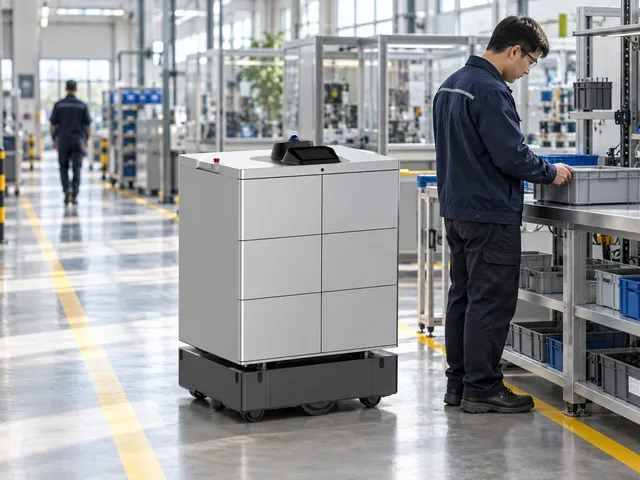
Set areas, checkpoints, routes, time and frequency.
Present collected information, task states and alerts.
Review readings, images or live views and decide on action.
Where the service helps
Coordinate routes, content and staff around these tasks.
Scheduled patrol
Execute configured routes, points and periods.
Priority revisit
Recheck selected areas as needed.
Alert review
Smoke, flame and stranger prompts depend on configuration and human confirmation.
Indoor only. Status-light recognition, prolonged-stay/fall detection, automatic approach and autonomous dispatch decisions are not established. A person-match alert does not itself establish unauthorized entry.
Service flow and ownership
Robots execute configured tasks; responsible staff retain verification and on-site response.
Set areas, checkpoints, routes, time and frequency.
Follow configured indoor routes and collect at checkpoints.
Present collected information, task states and alerts.
Review readings, images or live views and decide on action.
Mark the outcome and retain task, location, time and event records.
Confirm execution separately from human handover/review; assigned staff take over exceptions.
Roles
Robot
Patrol, collect and report site information.
Duty staff
Review conditions and contact responders.
Site and support staff
Respond and maintain equipment, routes and records.
Service modes
Select modes for the workflow; agree extensions separately.
Scheduled patrol
Execute configured routes, points and periods.
Priority revisit
Recheck selected areas as needed.
Alert review
Smoke, flame and stranger prompts depend on configuration and human confirmation.
Indoor only. Status-light recognition, prolonged-stay/fall detection, automatic approach and autonomous dispatch decisions are not established. A person-match alert does not itself establish unauthorized entry.
Scenario fit
Robots patrol, collect and notify; the platform unifies records and enterprise staff decide and respond. Open interfaces expose video, snapshots, events, devices and patrol logs.
Scheduled patrol
Execute configured routes, points and periods.
Priority revisit
Recheck selected areas as needed.
Alert review
Smoke, flame and stranger prompts depend on configuration and human confirmation.
Terminals and configuration
Document-based scope; confirm supplied model, options and site fit.
Three layers
Robot collection/notification, platform aggregation/open access, enterprise decisions/actions.
Five interface areas
Video, snapshots, events, devices and patrol logs; assess REST API/Webhook against the interface plan.
Coordination priorities
Assign suitable repeated routes to robots and compare results in the pilot.
Verify outcomes against task, destination and responsible role.
Use task states and exception records to adjust routes, schedules and configuration.
Routes and service points
Configure routes for the actual site; diagrams explain the workflow.
Workshop / storage corridors
Run only on validated indoor routes.
Entrances / equipment-room exteriors
Capture checkpoints outside hazardous processes.
Office links
Configure access, shifts and patrol schedules.
Locations
- Workshop / storage corridors
- Entrances / equipment-room exteriors
- Office links
Diagrams explain the flow; survey actual passages, thresholds, access and stops.
Site readiness and operations
Confirm site, equipment and staffing; verify interfaces per project.
Response loop
Staff confirm alerts and mark handled/unhandled; enterprise video AI, EHS and ticket automation are optional integrations.
Schedule example
The source illustrates 08:00/12:00/16:00 and 22:00/02:00/05:00 rounds; adapt to shifts.
Commission configured interfaces, notifications and access; assign site contacts and staff fallback.
Document configuration and device checks
| Three layers | Robot collection/notification, platform aggregation/open access, enterprise decisions/actions. |
|---|---|
| Five interface areas | Video, snapshots, events, devices and patrol logs; assess REST API/Webhook against the interface plan. |
Document and current product versions may differ; confirm supplied specifications and project configuration.
Pilot and expansion
Start with one robot, one standard indoor route and priority revisit points. Validate alerts, human confirmation and response records before extending interfaces.
Three layers
Robot collection/notification, platform aggregation/open access, enterprise decisions/actions.
Five interface areas
Video, snapshots, events, devices and patrol logs; assess REST API/Webhook against the interface plan.
Suggested sizing assessment
Match full patrol cycles to measured checkpoint revisit intervalsUse site data including access, handover, waiting, charging and exceptions; travel speed alone does not establish capacity.
This is an assessment method; source recommendations/targets are not universal performance guarantees.
Sizing considerations
Task cycle
Measure request, execution, handover, return and charging time.
Site scope
Workshop / storage corridors, Entrances / equipment-room exteriors, Office links
Staff coordination
Allow for available receiving, reviewing and exception-response staff.
Source configurations/data refer to their stated scenario; confirm final sizing through site validation.
Suggested implementation
The following are project assessment and acceptance suggestions, subject to site confirmation.
Confirm scope
Site preparation
Configure and commission
When ready
Trial and acceptance
By project agreement
Suggested exception handling
The following are project assessment and acceptance suggestions, subject to site confirmation.
| Condition | Action | Ownership and records |
|---|---|---|
| Task cannot continue | Pause, wait or hand over to staff under site rules. | Managers record cause, owner and recovery conditions. |
| Handover/review incomplete | Contact the assigned staff; automatic task closure does not replace their confirmation. | Record the reason and follow-up. |
| Device/access exception | Follow support procedures and use staff service if required. | Support and site staff coordinate and validate recovery. |
Common questions
Where should the pilot start?
Start with one robot, one standard indoor route and priority revisit points. Validate alerts, human confirmation and response records before extending interfaces.
How do robots and staff share work?
Robot:Patrol, collect and report site information. Duty staff:Review conditions and contact responders. Site and support staff:Respond and maintain equipment, routes and records.
What needs separate confirmation?
Indoor only. Status-light recognition, prolonged-stay/fall detection, automatic approach and autonomous dispatch decisions are not established. A person-match alert does not itself establish unauthorized entry.
How are configuration and acceptance set?
Use source recommendations as a starting point, then confirm against site routes, supplied equipment and trial data. Suggested checks do not establish fixed performance or service guarantees.
Pilot preparation
Start with one robot, one standard indoor route and priority revisit points. Validate alerts, human confirmation and response records before extending interfaces.
| Item | Scope | Confirmation |
|---|---|---|
| Scope and points | Workshop / storage corridors, Entrances / equipment-room exteriors, Office links | Confirm accessible scope and responsible staff on site. |
| Routes and access | Maps, passages, doors/lifts, network and charging. | Commission cross-floor and controlled-door access as needed; diagrams do not replace site tests. |
| Handover and exceptions | Robot, Duty staff, Site and support staff | Agree notifications, staff takeover, records and review rules. |
Scope and points
Workshop / storage corridors, Entrances / equipment-room exteriors, Office links Confirm accessible scope and responsible staff on site.
Routes and access
Maps, passages, doors/lifts, network and charging. Commission cross-floor and controlled-door access as needed; diagrams do not replace site tests.
Handover and exceptions
Robot, Duty staff, Site and support staff Agree notifications, staff takeover, records and review rules.
Related equipment
Review product information and reconcile the document version with the supplied model/configuration.
View productRelated solutions
Choose a dedicated solution for each workflow.
Factory indoor security patrol
Robots patrol, collect and notify; the platform unifies records and enterprise staff decide and respond.
Explore Solution →Factory air and odor patrol solution
Collect air readings along workshop, storage and shared-corridor routes, revisit anomalies and let staff review and respond.
Explore Solution →Production-line material and tool delivery
Transport standard materials, tools and empty containers through requests, preparation, loading, delivery, human checks and records.
Explore Solution →